
















Arrows
Arrows
117 مرات لعب








ألغاز
Arrows
قيّم هذه اللعبة
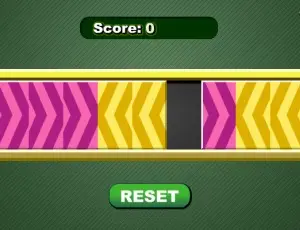
Play with the arrows and see if you are among the brightest league of mathematicians! In this game, your task is to swap two sets of color arrows so that their positions are exchanged. When the game opens, you will be given a rectangle containing 8 arrow tiles, with 4 purple tiles on the left and 4 yellow tiles on the right, plus an empty space that separates the two sets of arrows in the middle. To swap the positions of the arrows, you may click a tile so that it moves to the empty space located in the direction that the arrow is pointing to, or jump over a tile of the opposite color and move to a blank. Once moved to the front, the arrows cannot move backward, for example, a purple arrow which is pointing to the right cannot be moved to the left after it has moved one step to the right. If no more moves can be made, you may click the Reset button under the puzzle to start again. Take notice of your score at the top of the screen and act quickly before it counts down to zero!
كيفية اللعب
- 1انقر أو اضغط داخل منطقة اللعبة للبدء.
- 2استخدم أدوات التحكم المعروضة في اللعبة واتبع هدف كل مستوى.
- 3فكّر مسبقًا، وتغلّب على نتيجتك، وجرّب ألعابًا مشابهة عند الانتهاء.
الأسئلة الشائعة
- هل Arrows مجانية؟
- نعم. Arrows مجانية تمامًا على ZibuGames: بدون دفع أو تحميل أو إنشاء حساب.
- هل أحتاج إلى تثبيت شيء لتشغيل Arrows؟
- لا. تعمل Arrows مباشرة في متصفحك — اضغط زر اللعب لتبدأ اللعبة.
- هل يمكنني لعب Arrows على الهاتف أو الجهاز اللوحي؟
- يتكيّف المشغّل مع حجم شاشتك، لذا تفتح Arrows على الهاتف والجهاز اللوحي كما تفتح على الحاسوب. أما الألعاب المصممة للوحة المفاتيح أو الفأرة فتكون أفضل على الحاسوب.
- ما نوع لعبة Arrows؟
- Arrows هي لعبة ألغاز يمكنك لعبها عبر الإنترنت على ZibuGames.
- كم مرة تم لعب Arrows؟
- تم لعب Arrows 117 مرة على ZibuGames حتى الآن.













Arrows
Arrows
117 مرات لعب
ألغاز
Arrows
قيّم هذه اللعبة
Play with the arrows and see if you are among the brightest league of mathematicians! In this game, your task is to swap two sets of color arrows so that their positions are exchanged. When the game opens, you will be given a rectangle containing 8 arrow tiles, with 4 purple tiles on the left and 4 yellow tiles on the right, plus an empty space that separates the two sets of arrows in the middle. To swap the positions of the arrows, you may click a tile so that it moves to the empty space located in the direction that the arrow is pointing to, or jump over a tile of the opposite color and move to a blank. Once moved to the front, the arrows cannot move backward, for example, a purple arrow which is pointing to the right cannot be moved to the left after it has moved one step to the right. If no more moves can be made, you may click the Reset button under the puzzle to start again. Take notice of your score at the top of the screen and act quickly before it counts down to zero!
كيفية اللعب
- 1انقر أو اضغط داخل منطقة اللعبة للبدء.
- 2استخدم أدوات التحكم المعروضة في اللعبة واتبع هدف كل مستوى.
- 3فكّر مسبقًا، وتغلّب على نتيجتك، وجرّب ألعابًا مشابهة عند الانتهاء.
الأسئلة الشائعة
- هل Arrows مجانية؟
- نعم. Arrows مجانية تمامًا على ZibuGames: بدون دفع أو تحميل أو إنشاء حساب.
- هل أحتاج إلى تثبيت شيء لتشغيل Arrows؟
- لا. تعمل Arrows مباشرة في متصفحك — اضغط زر اللعب لتبدأ اللعبة.
- هل يمكنني لعب Arrows على الهاتف أو الجهاز اللوحي؟
- يتكيّف المشغّل مع حجم شاشتك، لذا تفتح Arrows على الهاتف والجهاز اللوحي كما تفتح على الحاسوب. أما الألعاب المصممة للوحة المفاتيح أو الفأرة فتكون أفضل على الحاسوب.
- ما نوع لعبة Arrows؟
- Arrows هي لعبة ألغاز يمكنك لعبها عبر الإنترنت على ZibuGames.
- كم مرة تم لعب Arrows؟
- تم لعب Arrows 117 مرة على ZibuGames حتى الآن.