
















Arrows
Arrows
115 plays








Puzzle
Arrows
Rate this game
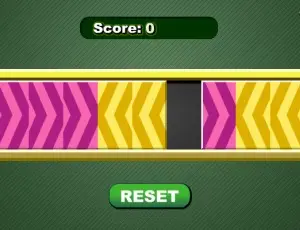
Play with the arrows and see if you are among the brightest league of mathematicians! In this game, your task is to swap two sets of color arrows so that their positions are exchanged. When the game opens, you will be given a rectangle containing 8 arrow tiles, with 4 purple tiles on the left and 4 yellow tiles on the right, plus an empty space that separates the two sets of arrows in the middle. To swap the positions of the arrows, you may click a tile so that it moves to the empty space located in the direction that the arrow is pointing to, or jump over a tile of the opposite color and move to a blank. Once moved to the front, the arrows cannot move backward, for example, a purple arrow which is pointing to the right cannot be moved to the left after it has moved one step to the right. If no more moves can be made, you may click the Reset button under the puzzle to start again. Take notice of your score at the top of the screen and act quickly before it counts down to zero!
Available inENTR· Coming soonES· Coming soonDE· Coming soonFR· Coming soonJA· Coming soonAR· Coming soonPT· Coming soon
How to Play
- 1Tap or click inside the game area to start.
- 2Use the controls shown in the game and follow each level objective.
- 3Think ahead, beat your score and try similar games when you finish.
Frequently asked questions
- Is Arrows free to play?
- Yes. Arrows is completely free on ZibuGames: no payment, no download and no account needed.
- Do I have to install anything to play Arrows?
- No. Arrows runs directly in your browser — press play and the game starts.
- Can I play Arrows on a phone or tablet?
- The player adapts to your screen, so Arrows opens on phones and tablets as well as on a computer. Games built around a keyboard or mouse still feel best on desktop.
- What kind of game is Arrows?
- Arrows is a Puzzle game you can play online on ZibuGames.
- How many times has Arrows been played?
- Arrows has been played 115 times on ZibuGames so far.















Arrows
Arrows
115 plays
Puzzle
Arrows
Rate this game
Play with the arrows and see if you are among the brightest league of mathematicians! In this game, your task is to swap two sets of color arrows so that their positions are exchanged. When the game opens, you will be given a rectangle containing 8 arrow tiles, with 4 purple tiles on the left and 4 yellow tiles on the right, plus an empty space that separates the two sets of arrows in the middle. To swap the positions of the arrows, you may click a tile so that it moves to the empty space located in the direction that the arrow is pointing to, or jump over a tile of the opposite color and move to a blank. Once moved to the front, the arrows cannot move backward, for example, a purple arrow which is pointing to the right cannot be moved to the left after it has moved one step to the right. If no more moves can be made, you may click the Reset button under the puzzle to start again. Take notice of your score at the top of the screen and act quickly before it counts down to zero!
Available inENTR· Coming soonES· Coming soonDE· Coming soonFR· Coming soonJA· Coming soonAR· Coming soonPT· Coming soon
How to Play
- 1Tap or click inside the game area to start.
- 2Use the controls shown in the game and follow each level objective.
- 3Think ahead, beat your score and try similar games when you finish.
Frequently asked questions
- Is Arrows free to play?
- Yes. Arrows is completely free on ZibuGames: no payment, no download and no account needed.
- Do I have to install anything to play Arrows?
- No. Arrows runs directly in your browser — press play and the game starts.
- Can I play Arrows on a phone or tablet?
- The player adapts to your screen, so Arrows opens on phones and tablets as well as on a computer. Games built around a keyboard or mouse still feel best on desktop.
- What kind of game is Arrows?
- Arrows is a Puzzle game you can play online on ZibuGames.
- How many times has Arrows been played?
- Arrows has been played 115 times on ZibuGames so far.